
Need Help? +254 714804532
Starlink Account Verification in Kenya helps users comply with KYC rules and avoid service interruption or suspension....
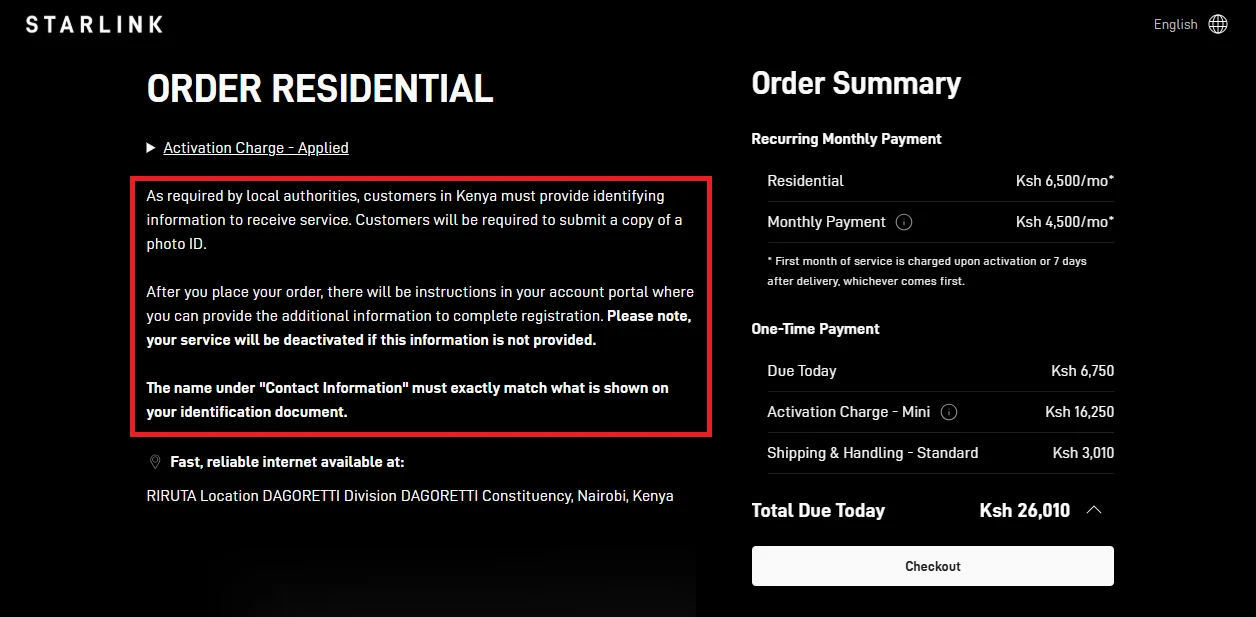

Starlink account verification in Kenya has become an essential requirement for all users who want to maintain uninterrupted internet service. As Starlink continues expanding rapidly across Kenya, the company now requires subscribers to confirm their identity through a mandatory verification process designed to comply with local regulations and improve account security. Whether you are using Starlink for home internet, business connectivity, remote work, construction sites, lodges, or rural internet access, completing account verification is now necessary to keep your service active and avoid unexpected interruptions.
Many users across Kenya are experiencing service suspensions because they failed to complete verification correctly or ignored the verification request displayed on their Starlink dashboard. In most cases, the process itself is simple and only takes a few minutes, but small mistakes such as entering names incorrectly, uploading unclear documents, or using details that do not exactly match the account information can cause repeated verification failures. Some users also experience delays due to system checks, document formatting issues, or temporary verification errors. Understanding the correct verification steps can help you avoid unnecessary frustration and prevent lengthy service downtimes.
At Starlink Kenya, we help users across Nairobi and other regions in Kenya complete their Starlink account verification process without complications. This guide explains everything you need to know, including the required documents, how to upload your identification correctly, common verification problems, troubleshooting tips, and practical ways to ensure your Starlink service remains fully active. By following the correct process carefully, you can complete verification smoothly and continue enjoying reliable high-speed satellite internet across Kenya.

Starlink account verification is the process of confirming a user’s identity using official identification documents linked to their account information. In Kenya, this process has become increasingly important as Starlink expands its satellite internet services across homes, businesses, institutions, and remote areas. Verification helps ensure that every Starlink account is connected to a legitimate individual or organization.
Starlink account verification serves several important purposes related to security, compliance, and account management. The process helps protect both users and the Starlink network while ensuring proper service registration in Kenya.
The purpose of Starlink account verification goes beyond simple identity confirmation. It helps protect users, improve network security, reduce fraud, and ensure compliance with Kenyan regulations. Proper verification creates a safer and more reliable experience for both residential and business users.
Starlink verification requirements can apply to various categories of users depending on account type, activation status, and regulatory requirements. Both new and existing customers may be asked to complete verification.
Even users who have been using Starlink for a long time may later receive requests to verify their accounts. Many existing customers in Kenya have recently received notifications requiring identity confirmation to continue using the service.
Verification requests for existing users may occur due to:
Existing users are encouraged to complete verification immediately after receiving notifications to avoid interruptions.
Verification applies to both residential and business Starlink users. Residential users normally verify using personal identification documents such as Kenyan National IDs or passports.
Business users may need to provide additional organizational documents including:
Organizations such as NGOs, hotels, schools, offices, and institutions may also be required to verify their operational details for compliance purposes.
Starlink verification affects a wide range of users including new customers, existing subscribers, residential users, and businesses. Completing verification promptly helps ensure uninterrupted service and smoother account management.
Starlink verification typically requires users to submit valid identification documents that match the information registered on the account. The required documents may vary depending on whether the account belongs to an individual or a business.
The Kenyan National ID is the most commonly used verification document for local users. The ID must be clear, readable, and valid during submission.
Users should ensure:
Many verification failures occur because users use nicknames, abbreviations, or incorrect name arrangements when creating their accounts.
Passports are commonly used by:
The passport upload should clearly display:
Poor-quality uploads or incomplete passport images may lead to rejection.
Businesses and organizations may be required to provide additional documents proving legal registration and operational authority.
Commonly requested business documents include:
These documents help confirm that the organization legally exists and that the account holder is authorized to manage the Starlink account.
Submitting correct and clear documents is one of the most important parts of successful Starlink verification. Properly matching account information with official identification helps reduce delays, rejections, and account restrictions.
Starlink account verification is usually completed online through official Starlink platforms. Users can complete the process using either the Starlink dashboard or the Starlink mobile application.
Most users complete verification directly through the Starlink account dashboard after logging into their accounts. Verification notifications often appear as banners or alerts requesting document submission.
The dashboard allows users to:
Desktop browsers are often recommended because uploads tend to work more reliably compared to some mobile devices.
Verification can also be completed using the Starlink mobile app. However, many users report smoother uploads and fewer errors when using desktop browsers such as Google Chrome.
The standard verification process usually includes:
Users experiencing repeated verification failures are often advised to retry using a browser instead of the app.
Some users may experience difficulties during verification including:
In such cases, users are usually advised to:
Starlink verification is mainly completed online through the Starlink dashboard or app. Using the correct platform, clear documents, and accurate account details significantly improves the chances of successful verification and uninterrupted service continuity.
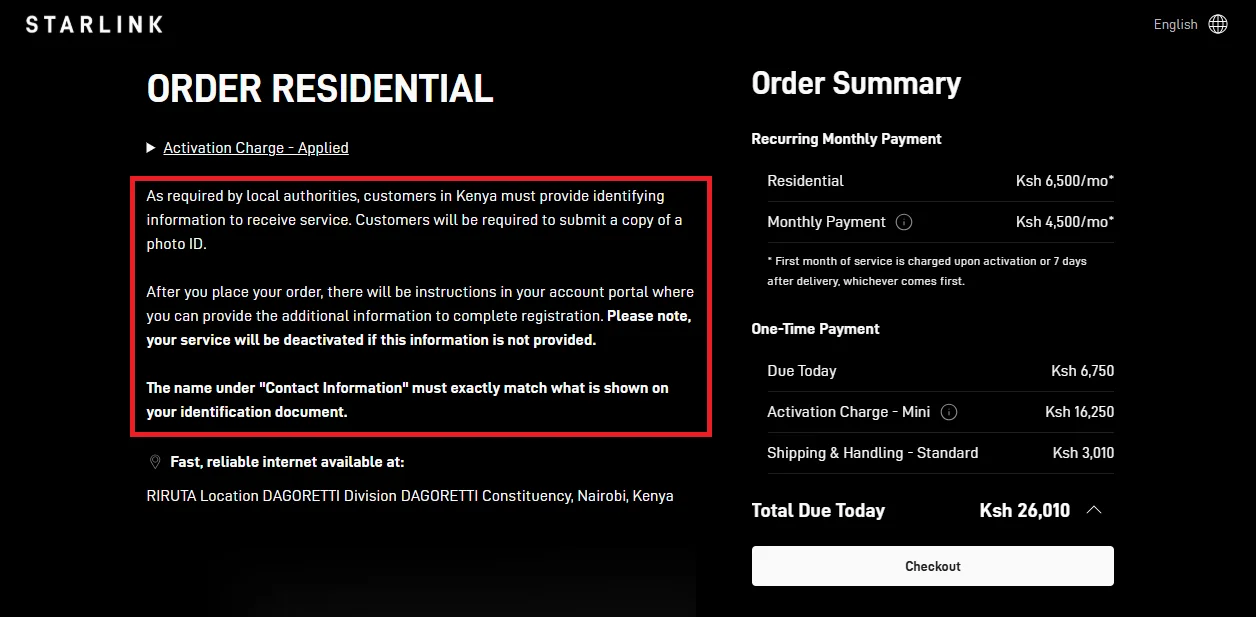
The Starlink account verification process in Kenya is usually straightforward when users provide the correct information and valid identification documents. Most verification problems occur because of name mismatches, unclear document uploads, or incorrect account details. Following the correct process carefully helps reduce delays and improve approval success rates.
The first step in completing Starlink verification is accessing the correct Starlink account associated with the active service. Users must ensure they log into the account that originally activated the Starlink kit.
Users should log into their accounts using the official Starlink website or Starlink mobile app. Accessing the correct platform helps ensure that all verification requests and notifications are visible.
The account dashboard is where users can:
Using unofficial links or third-party platforms should be avoided because they may expose users to phishing or account security risks.
It is important to log in using the exact email address linked to the Starlink account. Many users experience difficulties because they accidentally use different email addresses during login attempts.
Users should:
Access to the correct account is necessary because verification requests only appear on the registered Starlink profile.
Although verification can be completed on mobile devices, many users experience better results using desktop browsers such as Google Chrome.
Using a laptop or desktop browser can:
A stable internet connection is also recommended during the verification process.
Successfully logging into the correct Starlink account is the foundation of the verification process. Using the proper email address, official Starlink platforms, and reliable browsers helps users avoid unnecessary complications during verification.
After logging into the account, users should carefully check for any verification alerts or notifications requesting identity confirmation.
Starlink commonly displays verification requests as banners or notifications labeled:
These alerts are usually visible within the account dashboard and may also be sent through email notifications.
Users should avoid ignoring these notifications because delayed verification may eventually result in restricted service access or suspension.
Once the alert appears, users should open the verification section to begin the process. This section usually provides:
Reading the instructions carefully before uploading documents helps reduce submission errors.
The verification section may also explain:
In some cases, Starlink may send additional instructions or reminders through email. Users should regularly monitor:
Important verification updates may include:
Checking verification notifications promptly helps users begin the process early and avoid unnecessary service interruptions. Carefully following the instructions provided within the verification section improves the chances of successful approval.
Uploading valid and clear identification documents is one of the most important parts of the Starlink verification process. Poor-quality uploads are among the most common reasons for verification failure.
All uploaded documents should be:
Important details such as names, ID numbers, photographs, and expiry dates should be clearly visible.
Users are advised to:
Clear uploads help Starlink systems process documents more accurately.
Blurry or partially cropped images frequently lead to rejected submissions. Users should ensure:
Common upload mistakes include:
Retaking clear images before submission can save significant time and frustration.
Commonly accepted documents include:
Business accounts may require multiple supporting documents depending on account type and organizational structure.
Uploading high-quality and valid identification documents greatly improves the likelihood of successful Starlink verification. Clear, complete, and readable uploads help reduce delays and minimize rejection risks.
Name matching is one of the most critical parts of the Starlink verification process. Even small differences between account names and identification documents can lead to verification failure.
The name entered on the Starlink account should match the identification document exactly, including:
Users should carefully compare:
Exact matching helps automated verification systems process accounts more accurately.
Users should avoid:
For example:
Even small inconsistencies may trigger rejection notices or manual reviews.
For company accounts, the registered business name on the Starlink account should match official business registration documents exactly.
Differences in:
may cause delays during business verification.
Accurate name matching is one of the most important requirements for successful Starlink verification. Ensuring exact consistency between account details and official documents helps users avoid common verification failures.
After confirming all information and uploading documents correctly, users can submit their verification request for review.
Approval timelines may vary depending on:
Some users receive approval within hours, while others may wait several days if additional review is required.
Users should remain patient during this process and avoid repeatedly submitting multiple uploads unless instructed to do so.
After submission, users should regularly check:
Possible status updates may include:
Promptly responding to requests for additional information helps speed up the process.
If verification remains pending for unusually long periods or repeatedly fails despite correct submissions, users may need to contact Starlink support.
Support may assist with:
Providing detailed explanations and screenshots may help speed up support responses.
Providing accurate account information, exact name matches, and clear identification documents significantly improves the chances of successful Starlink verification. Carefully following each step helps users avoid delays, failed submissions, and unnecessary service interruptions in Kenya.
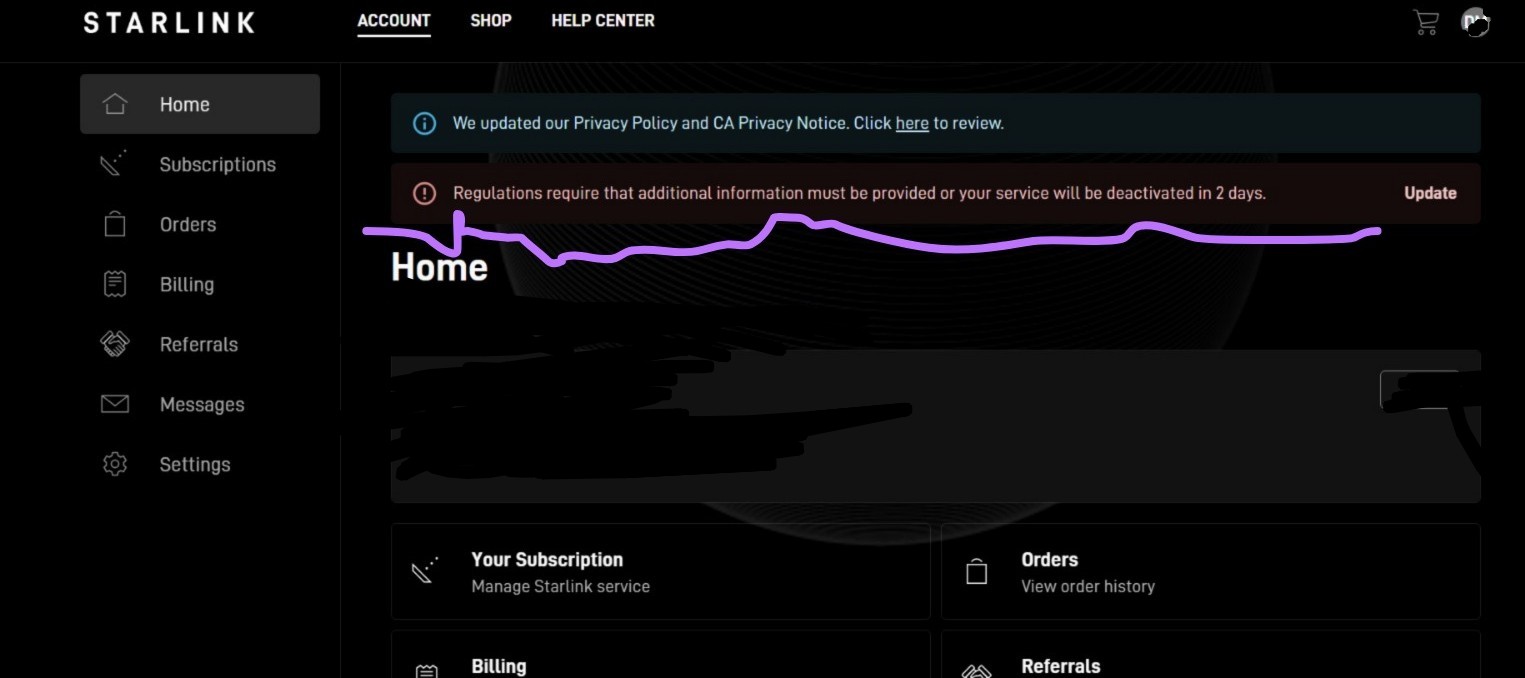
Many Starlink users in Kenya experience verification problems during the identity confirmation process. In most cases, these issues are not caused by invalid accounts but rather by small mistakes, mismatched information, unclear document uploads, or temporary technical system failures. Understanding these common problems helps users avoid unnecessary delays and frustration.
Name mismatch errors are among the most common reasons Starlink verification fails in Kenya. Automated verification systems rely heavily on exact name matching between account details and uploaded identification documents.
Users sometimes enter their names in a different order from what appears on their official documents. Even when the names are correct, changing the sequence may trigger verification failure.
Examples of common issues include:
Automated systems may treat these differences as entirely different identities, resulting in rejection notices.
Many users accidentally leave out middle names when creating their Starlink accounts. However, if the uploaded ID includes a middle name that does not appear on the account, verification may fail.
This problem commonly occurs when:
To improve approval chances, users should ensure all names appear exactly as shown on the official identification document.
Using nicknames, abbreviated names, or informal spellings is another major cause of verification failure.
Examples include:
Verification systems are designed to match official government records, meaning informal names may not be accepted.
Name mismatch errors are one of the leading causes of failed Starlink verification. Ensuring exact consistency between account names and official identification documents significantly improves verification success rates.
Repeated failed submissions can cause temporary account restrictions or verification locks. This issue often occurs when users repeatedly retry uploads without correcting the original problem.
Starlink systems may temporarily block additional verification attempts after several failed submissions. This security measure helps prevent abuse, fraudulent activity, and excessive automated retries.
Users may receive messages such as:
These restrictions may remain active for several hours or even days, depending on the system response.
Many users repeatedly upload the same incorrect documents or unchanged account details hoping the system will eventually approve them. Unfortunately, repeated submissions without correcting the issue usually worsen the problem.
Users should first review:
before attempting another submission.
If verification is tied to account restrictions or service suspension, temporary verification locks can significantly delay account recovery and internet restoration.
In some cases, users may need to:
Exceeded verification attempts are usually caused by repeated failed submissions. Carefully reviewing and correcting errors before retrying helps users avoid temporary account locks and longer verification delays.
Poor-quality document uploads are another major reason for verification rejection. Automated systems require clear and readable images to confirm identity details accurately.
Documents photographed in poor lighting conditions often become difficult to read. Blurry images may prevent systems from identifying important information such as:
Common causes of blurry uploads include:
Using natural lighting or bright indoor lighting helps improve image clarity.
Many users accidentally upload cropped or incomplete document images. Missing edges, hidden details, or partially visible text may cause automatic rejection.
Users should ensure:
The full identification document should appear clearly within the frame before submission.
Some uploads fail because:
Using high-quality JPEG or PNG images typically improves upload reliability.
Clear and complete document uploads are essential for successful Starlink verification. Proper lighting, accurate focus, and full document visibility help reduce rejection rates and speed up approval.
Technical system problems can sometimes interfere with Starlink verification even when users provide correct information and valid documents.
Starlink verification often relies on automated systems that process large numbers of submissions. During periods of heavy demand, users may experience:
In many cases, the delay is not caused by user errors but by high verification volumes or temporary processing backlogs.
Technical issues involving servers or verification APIs can also cause failures. These problems may result in:
Sometimes users receive generic error messages even when all information is correct.
Examples include:
These errors may occur temporarily and often improve once the system stabilizes.
Some verification issues are linked to:
Many users report better success using:
Clearing the browser cache and retrying later may also help.
Not all verification failures are caused by user mistakes. Technical system limitations, server delays, and automated processing errors can also affect approval timelines even when documents are valid.
Business accounts often face more complex verification requirements compared to residential users because organizational ownership must also be confirmed.
One of the most common business verification problems occurs when the company name on the Starlink account does not exactly match official registration documents.
Differences may include:
Even small inconsistencies can trigger verification failure.
Some businesses fail verification because they do not upload all required supporting documents.
Additional documents may include:
Incomplete submissions may delay the approval process significantly.
Business accounts sometimes involve multiple employees or administrators accessing the account. This may create confusion regarding:
Using consistent company information and assigning a primary administrator helps reduce verification complications.
Business verification can be more complicated because organizational ownership and legal registration details must align perfectly with account records. Accurate company information and complete supporting documents help improve approval success for business users.
Most Starlink verification issues in Kenya are caused by mismatched account details, unclear document uploads, repeated failed attempts, or temporary technical system problems rather than invalid accounts. Understanding these common challenges helps users prepare properly, avoid unnecessary delays, and improve their chances of successful verification.

Starlink verification failures in Kenya are often caused by avoidable mistakes such as unclear document uploads, incorrect account details, repeated failed attempts, or poor image quality. In many cases, users can complete verification successfully on the first attempt by carefully preparing their documents and reviewing their information before submission.
Using a laptop or desktop browser is one of the most effective ways to improve the Starlink verification experience. Many users encounter fewer technical problems when using desktop devices compared to mobile phones.
Desktop browsers often provide:
Some mobile devices may experience:
Using a reliable desktop browser such as Google Chrome can help reduce technical verification issues.
Larger screens make it easier for users to:
Desktop devices also allow users to manage files more efficiently and preview image quality more clearly before uploading documents.
Some Starlink verification features may work better on updated desktop browsers. Users are advised to:
These steps can help improve verification reliability and reduce submission failures.
Using a laptop or desktop browser improves upload stability, document visibility, and overall verification reliability. Desktop verification often reduces technical issues that may occur on mobile devices.
Document image quality plays a major role in successful Starlink verification. Poor-quality uploads are one of the most common causes of rejection.
Documents should be photographed in bright and clear lighting conditions. Good lighting helps ensure:
Users should avoid:
Natural daylight or bright indoor lighting usually produces better document images.
Glare and shadows can hide important information on identification documents. Users should carefully position documents to prevent reflections from lights or camera flashes.
Common problems caused by glare include:
To reduce glare:
High-resolution images improve readability and increase verification accuracy. Clear images help automated systems identify details more efficiently.
Users should:
Blurry or pixelated uploads often lead to failed verification attempts.
Clear and high-quality document images greatly improve the chances of successful Starlink verification. Proper lighting, reduced glare, and sharp image quality help prevent unnecessary rejection or delays.
Carefully reviewing account information before submission is one of the most important steps in avoiding verification failure.
Users should carefully confirm:
Small typographical mistakes can cause automated systems to reject verification requests.
Users should compare:
before final submission.
Exact name matching is critical during Starlink verification. The name on the account should appear exactly as shown on the identification document.
Users should avoid:
Examples of potential mismatches include:
Even minor inconsistencies may trigger rejection notices.
For company accounts, users should confirm:
Business account verification often requires exact consistency between all submitted records.
Carefully reviewing names, identification numbers, and account information before submission helps users avoid one of the most common causes of Starlink verification failure.
Repeated verification failures can trigger temporary account restrictions or verification locks. Users should avoid repeatedly submitting documents without correcting the original issue.
Starlink systems may temporarily block further attempts after multiple failed submissions. This security measure helps reduce fraud and excessive automated retries.
Users may encounter messages such as:
Temporary restrictions may delay service restoration or account approval.
Instead of repeatedly resubmitting documents, users should first identify the likely cause of failure.
Important areas to review include:
Correcting the issue before retrying usually improves approval chances significantly.
If repeated failures continue despite correct information, users may need to contact Starlink support for assistance.
Support may help with:
Providing screenshots and detailed explanations may speed up the support process.
Avoiding repeated unnecessary verification attempts helps reduce the risk of temporary locks and longer delays. Carefully reviewing errors before retrying improves the likelihood of successful approval.
Using valid and official identification documents is essential for successful Starlink verification. Unofficial or altered documents are likely to be rejected immediately.
Users should never upload:
Verification systems are designed to detect irregularities and may reject altered submissions automatically.
Official documents should:
Using current and legitimate identification helps verification systems process accounts more smoothly.
For business accounts, organizations should upload legitimate company documents, including:
Using incomplete or unofficial business records may delay verification.
Attention to detail is one of the best ways to complete Starlink verification successfully on the first attempt. Using desktop browsers, uploading clear images, verifying account details carefully, avoiding repeated failed attempts, and submitting official documents significantly improve approval success while reducing delays and account restrictions.
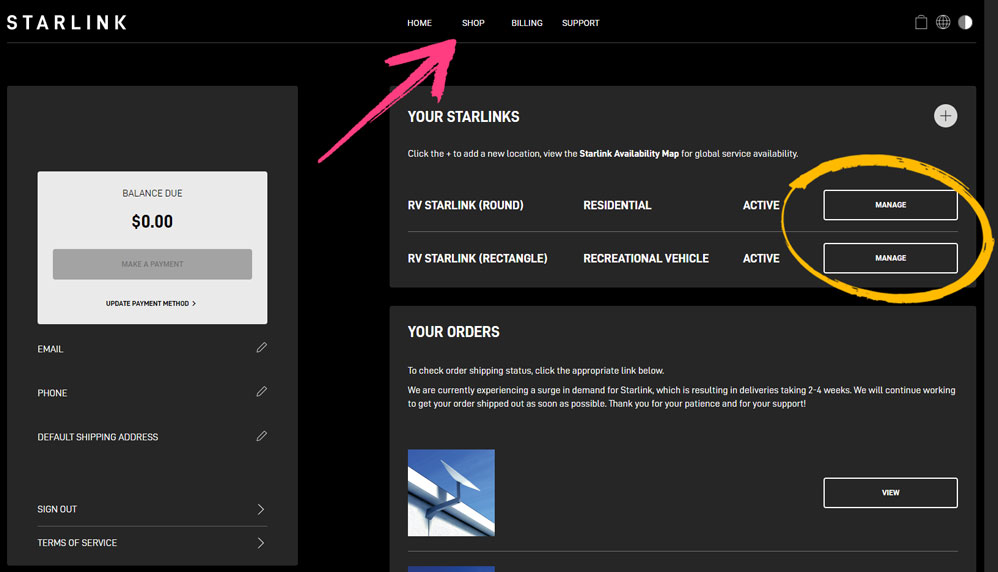
Failing to complete Starlink account verification in Kenya can lead to several service-related complications that may affect internet access, account management, and customer support assistance. As Starlink continues implementing identity verification requirements, unverified accounts may face restrictions even when subscriptions are fully paid and equipment is functioning properly.
One of the most serious consequences of failing to verify a Starlink account is temporary service suspension. Unverified accounts may eventually lose internet access until verification requirements are completed successfully.
Starlink may temporarily disable internet connectivity for accounts that remain unverified after repeated reminders or compliance deadlines.
Users experiencing suspension may notice:
This can be highly disruptive for:
Many users assume that paying for monthly subscriptions guarantees uninterrupted service. However, verification compliance is separate from billing status.
This means users may still experience:
even when all subscription payments are fully up to date.
Businesses relying heavily on Starlink internet may experience operational disruptions if services are suspended due to failed verification.
Possible business impacts include:
Completing verification early helps organizations avoid unnecessary downtime.
Service suspension is one of the biggest risks of failing to complete Starlink verification. Timely compliance helps users maintain uninterrupted internet connectivity and avoid operational disruptions.
Unverified users may also experience restrictions on certain Starlink account functions even before full service suspension occurs.
Starlink may limit access to specific account management features until verification is completed.
Restricted functions may include:
These limitations can make it difficult for users to fully manage their accounts.
Some support-related functions may also become limited for unverified accounts. Users may experience:
In certain situations, users may be required to complete verification before support agents can fully process account-related requests.
Unverified accounts often continue receiving repeated notifications reminding users to complete verification.
Common warnings may include:
Ignoring these warnings for extended periods may eventually result in stricter restrictions.
Limited account access can make it difficult for users to manage subscriptions, update information, or receive support effectively. Completing verification helps restore full account functionality and improves overall account management.
If an account becomes suspended due to failed verification, restoring service may not happen immediately, even after documents are eventually submitted.
Accounts requiring manual review may experience delays during reactivation. This is especially common when:
Manual verification reviews may take significantly longer than automated approvals.
In some cases, Starlink systems may require:
These processes can increase waiting periods before internet service is restored.
Users may remain without connectivity while waiting for:
Business accounts often involve more complex verification procedures because organizational documents must also be validated.
This may require:
As a result, reactivation timelines for business accounts may sometimes be longer.
Delayed reactivation can create extended internet downtime for users who fail to complete verification early. Resolving verification problems after suspension often takes longer than completing verification proactively.
High volumes of verification requests can place significant pressure on Starlink customer support systems, especially during periods of widespread compliance enforcement.
When many users experience verification problems simultaneously, support response times may increase significantly.
Users may encounter:
Support delays can become frustrating for users urgently trying to restore suspended internet services.
Many verification-related inquiries are first processed through automated support systems. This can make it difficult for users with unique issues to receive personalized assistance immediately.
Users may receive generic responses such as:
Complex cases may eventually require manual escalation to human support teams.
If support assistance takes longer, users may remain disconnected for extended periods while waiting for:
This can significantly affect businesses and households that rely heavily on uninterrupted internet access.
Increased support demand can slow down verification assistance and prolong service restoration. Completing verification correctly and early helps users avoid joining large support queues during high-demand periods.
Failing to complete Starlink account verification can result in service suspension, limited account access, delayed reactivation, and slower customer support assistance. Timely verification helps users avoid unnecessary downtime, account complications, and prolonged internet interruptions while ensuring continued access to Starlink services in Kenya.
Some Starlink verification problems cannot be resolved through repeated uploads or account retries alone. In cases involving persistent system errors, locked verification attempts, rejected documents, or unresolved name mismatches, users may need direct assistance from Starlink support.
The first step in resolving serious verification issues is opening a support ticket through the official Starlink account system.
Users can usually access support through:
The support area allows users to:
Support tickets are typically linked directly to the affected Starlink account, helping Starlink identify the user’s subscription and service status more easily.
When opening a ticket, users should select the category most closely related to the problem, such as:
Choosing the correct category may help route the issue to the appropriate support team more quickly.
Submitting many duplicate tickets for the same issue may slow down responses and create confusion within the support system.
Instead, users should:
Organized communication often improves support efficiency.
Opening a properly categorized support ticket through the official Starlink platform is the first step toward resolving verification problems. Using the correct support channels helps users receive more accurate and organized assistance.
Providing a clear and detailed explanation of the verification problem helps Starlink support understand the issue faster and reduces unnecessary back-and-forth communication.
Users should explain:
Including exact wording from system notifications is very important because support agents rely on those details to identify specific verification problems.
Examples of common errors include:
Clear descriptions help support teams diagnose the issue more efficiently.
Users should also mention any troubleshooting steps already completed, such as:
This helps prevent support from repeating basic instructions unnecessarily.
Even when frustrated, users should keep support messages:
Well-structured explanations are easier for support agents to review and escalate where necessary.Clearly explaining verification problems improves communication with Starlink support and increases the chances of receiving faster and more accurate assistance.
Supporting documents play a major role in helping Starlink support review verification disputes or manual account checks.
Useful attachments may include:
Visual evidence helps support teams understand exactly what users are experiencing.
Supporting files should:
Low-quality screenshots or unreadable documents may delay support reviews.
For company accounts, users may also need to provide:
Providing complete documentation early may reduce repeated support requests for additional information.
Users should avoid attaching unrelated or excessive files that do not directly help explain the verification issue. Organized and relevant evidence makes support review easier.
Providing clear screenshots and valid supporting documents helps Starlink support review verification issues more effectively and speeds up the troubleshooting process.
Some verification problems cannot be solved automatically and may require manual review by a human support representative.
Automated systems may struggle with:
In these situations, requesting manual review may help resolve issues that automated systems repeatedly reject.
Users requesting human review should clearly explain:
Providing context helps support agents better understand the situation.
If basic support responses do not resolve the issue, users may request:
This may be especially important for users experiencing prolonged suspension despite valid documentation.
Manual verification often takes longer than automated approval because support agents may need to:
Users should continue monitoring responses while waiting for updates.
Requesting human review can help resolve complex verification issues that automated systems cannot process properly. Manual support intervention is sometimes necessary for successful account recovery.
After submitting a support request, users should regularly monitor their account and communication channels for updates from Starlink support.
Support responses may appear through:
Users should frequently monitor:
Missing a support response may delay issue resolution significantly.
Support teams may request:
Prompt responses help keep the support process moving efficiently.
Users are advised to save:
Keeping organized records may help if escalation becomes necessary later.
If responses become delayed, users may follow up politely within the same support ticket instead of opening multiple new requests.
Professional follow-ups often help maintain organized communication and improve support handling.
Regularly monitoring Starlink support responses helps users avoid missed updates and speeds up verification issue resolution. Prompt communication and organized follow-ups improve the overall support experience.
Providing detailed information, clear screenshots, and valid supporting documents significantly improves the chances of resolving Starlink verification issues more quickly. Opening organized support tickets, explaining problems clearly, requesting manual review where necessary, and monitoring responses regularly can help users restore account access and complete verification successfully in Kenya.

Proper account information is one of the most important parts of maintaining a secure and reliable Starlink service in Kenya. The information entered during account registration is directly connected to identity verification, billing, technical support, regulatory compliance, and overall account security. Even small inaccuracies can create major complications later when users need support or verification assistance.
Correct account information helps confirm legitimate ownership of the Starlink account and protects users from unauthorized activity or disputes.
Accurate registration details help Starlink identify the rightful account owner when account modifications are requested. This reduces the risk of unauthorized users making changes to:
Verification systems rely heavily on account information to determine who is authorized to manage the service.
Matching official identification documents with account details strengthens overall account protection. It becomes easier for Starlink to detect suspicious activities such as:
Users with properly registered information are generally better protected during account disputes or recovery requests.
Incorrect or inconsistent account details can create confusion regarding account ownership, especially when:
Clear and accurate information helps avoid conflicts during future account management processes.
Proper account information helps protect Starlink ownership rights, improve security, and reduce the risk of unauthorized account activity or ownership disputes.
Accurate account information makes it much easier for users to receive technical support, account assistance, and service troubleshooting from Starlink support teams.
When account information matches official records correctly, support agents can verify ownership more quickly during:
This helps reduce delays during urgent support situations.
Support teams often request account confirmation before making important changes or disclosing sensitive account details.
Users with accurate information may experience:
Incorrect information may trigger additional verification requirements and longer support delays.
Correct account details also help ensure users receive:
Using accurate contact information reduces the risk of missing critical account communications.
Accurate account information simplifies future support interactions and helps users receive faster and more effective assistance when technical or account-related issues arise.
Proper account information plays an important role in helping Starlink comply with telecommunications regulations and identity verification requirements in Kenya.
Telecommunications providers are often required to maintain accurate customer identification records. Proper account information helps Starlink:
As regulations evolve, verification requirements may become stricter for both residential and business users.
Accounts with accurate and complete information are more likely to pass automated verification checks successfully.
Verification systems rely on:
Even small inconsistencies may cause verification failure or account review delays.
Business accounts may require additional compliance checks involving:
Maintaining accurate business information helps organizations avoid unnecessary verification complications.
Proper account information supports Starlink’s compliance obligations while helping users complete verification successfully and maintain uninterrupted service access.
Incorrect or outdated account information can increase the risk of service interruptions, verification failures, and account restrictions.
Many service suspension issues occur because:
Accurate account information helps prevent these avoidable complications.
Users with properly registered information are less likely to experience:
This helps maintain smoother account operations and faster verification approval.
Stable and accurate account records support:
Businesses, institutions, and remote workers especially benefit from maintaining consistent account information because service interruptions may affect daily operations significantly.
Correct account information also makes future changes easier, including:
Properly maintained records reduce complications during these processes.
Maintaining accurate account information significantly reduces the risk of service interruptions, verification failures, and account management complications. Proper records help users maintain more stable and reliable Starlink services.
Accurate account information helps maintain stable, secure, and uninterrupted Starlink service in Kenya. Proper registration details improve account security, simplify support requests, support regulatory compliance, and reduce the risk of unnecessary suspensions or verification problems. Careful attention to account accuracy is one of the best ways to ensure smooth long-term Starlink service management.

Starlink account verification can sometimes become confusing, especially for users experiencing system errors, document rejection, name mismatches, or service restrictions. Having access to reliable and locally relevant guidance can make the verification process much easier and reduce the chances of costly mistakes or unnecessary delays.
Access to accurate and reliable information is critical when handling Starlink account verification and support-related issues.
Mwanga provides verification guidance designed specifically for the Kenyan Starlink environment. This is important because many verification challenges affecting users in Kenya are linked to:
Localized guidance helps users understand the exact steps needed to complete verification successfully within the Kenyan market.
Starlink systems and verification procedures may change over time. Mwanga helps users stay informed about:
Staying informed helps users avoid outdated verification methods that may no longer work properly.
Many users prefer practical step-by-step explanations rather than overly technical instructions. Mwanga focuses on providing:
This helps users complete verification with greater confidence and fewer complications.
Reliable and locally relevant Starlink information helps Kenyan users understand verification requirements more clearly and avoid common account verification mistakes.
Proper Starlink installation and account setup can play an important role in reducing future verification and service-related problems.
Mwanga provides guidance for different types of Starlink users including:
Different user categories may face different verification and setup requirements, especially for business accounts requiring organizational documentation.
Correct setup during account registration helps reduce future verification complications. Mwanga helps users understand:
Proper setup from the beginning reduces the risk of verification mismatches later.
Installation expertise also helps users better understand:
This improves the overall Starlink experience while reducing unnecessary technical support requests.
Installation and setup expertise helps users avoid registration mistakes, improve service performance, and reduce future verification or technical support challenges.
Many verification and service problems can be resolved more quickly when users understand the underlying cause of the issue.
Mwanga helps users identify and understand common Starlink verification problems such as:
Understanding the cause of the problem helps users avoid repeatedly making the same mistakes.
Some users experience technical system issues unrelated to their documents. Mwanga provides practical troubleshooting advice for issues including:
This helps users determine whether the issue is technical or account-related.
Users may receive guidance on:
These recommendations can significantly improve verification success rates.
Strong troubleshooting knowledge helps users identify verification problems faster, reduce frustration, and improve their chances of successful account approval.
Experience working with Starlink systems and users provides valuable insight into common account, verification, and support challenges.
Mwanga understands many aspects of the Starlink ecosystem including:
This experience helps users receive more practical and realistic guidance based on actual Starlink operational processes.
Many users experience similar problems during:
Industry experience helps identify patterns and recommend proven solutions more efficiently.
Users struggling with unresolved verification issues may benefit from guidance on:
Practical experience helps users navigate support processes more effectively.
Industry experience provides valuable insight into Starlink systems, policies, and user challenges, helping users approach verification and troubleshooting more effectively.
Practical and customer-focused guidance helps users minimize downtime, avoid unnecessary frustration, and maintain uninterrupted Starlink service.
Mwanga focuses on helping users avoid issues that commonly lead to:
Preventive guidance often saves users significant time and frustration.
Customer-focused guidance addresses practical problems users actually face, including:
This helps users receive advice that is directly relevant to their situation.
Users are encouraged to:
Good preparation significantly improves verification success rates.
Reliable internet access is increasingly important for:
Customer-focused verification guidance helps users maintain stable and uninterrupted Starlink connectivity.
Customer-focused support helps users avoid common verification mistakes, reduce downtime, and maintain smoother long-term Starlink service experiences.
Access to accurate, practical, and locally relevant information helps users navigate Starlink verification more successfully. Through reliable guidance, troubleshooting expertise, installation knowledge, industry experience, and customer-focused support, Mwanga helps Kenyan users reduce verification complications and maintain more stable Starlink services.
Starlink account verification has become an important topic for many users in Kenya as verification requirements continue expanding across residential and business accounts. Many customers experience questions regarding document requirements, account suspension risks, verification failures, and support processes.
Understanding these frequently asked questions helps users prepare properly, avoid common mistakes, and complete verification more successfully. The following FAQs address some of the most common concerns raised by Starlink users in Kenya.
Yes, many Starlink users in Kenya are now required to verify their accounts to maintain active service. Verification helps confirm account ownership, improve security, and support regulatory compliance requirements.
Users may receive:
Failure to complete verification may eventually result in:
Both residential and business users may be affected by verification requirements.
Starlink account verification is increasingly becoming a mandatory requirement for maintaining uninterrupted service access in Kenya.
Starlink commonly requires official identification documents that match the account details provided during registration.
Typical documents include:
For business accounts, additional organizational documents may also be requested depending on the account structure.
Documents should:
Providing proper and valid identification documents is essential for successful Starlink verification and account approval.
Verification failures are usually caused by mismatched account details, poor-quality uploads, or technical system issues rather than invalid accounts.
Common causes include:
Even small inconsistencies between account details and identification documents may trigger rejection.
Most verification failures occur because of avoidable errors related to account information or document quality.
Yes, unresolved verification requests may eventually lead to temporary service suspension or restricted account access.
Users who ignore verification notifications for extended periods may experience:
This may happen even when subscriptions are fully paid.
Businesses and remote workers relying heavily on Starlink services are especially encouraged to complete verification early to avoid operational disruptions.
Failing to complete verification can lead to internet suspension and service interruptions if the issue remains unresolved.
Verification timelines vary depending on:
Some users receive approval within:
Other cases involving:
may take several days.
Users should regularly monitor:
Starlink verification may take anywhere from several hours to multiple days depending on the complexity of the verification process.
Yes, users can complete Starlink verification using mobile phones through the Starlink app or browser. However, many users report better reliability when using desktop browsers.
Desktop devices often provide:
Google Chrome on a laptop or desktop is commonly recommended for smoother verification experiences.
Mobile verification is possible, but desktop browsers often provide a more stable and reliable verification process.
Repeated failed verification attempts may trigger temporary restrictions on the account verification system.
Users may receive messages such as:
Temporary restrictions may:
Users should carefully correct errors before retrying verification rather than repeatedly submitting the same information.
Exceeding verification attempts may temporarily lock the verification process and delay account approval.
Yes, business accounts can be verified using official company registration documents and authorized representative information.
Business verification may require:
The business name on the Starlink account should match official registration documents exactly.
Business account verification is possible when valid company documentation and accurate organizational information are provided.
Yes, exact name matching is extremely important during Starlink verification.
Users should ensure:
Users should avoid:
Even small differences may cause verification failure.
Exact name matching between account details and identification documents is one of the most important parts of successful verification.
Yes, some verification cases may require manual review by Starlink support, especially when automated systems repeatedly fail.
Manual review may help resolve:
Users may need to:
Manual reviews may take longer than automated approvals.
Starlink support can manually review certain verification cases when automated systems are unable to complete the process successfully.
No, blurry or unclear documents are usually rejected during the verification process.
Documents should:
Common upload problems include:
Using high-quality images significantly improves approval chances.
Clear and fully visible identification documents are essential for successful Starlink verification approval.
Users can obtain Starlink guidance in Kenya from reliable and experienced sources such as Mwanga.
Mwanga helps users with:
Locally relevant guidance can help users:
Reliable local guidance from experienced sources like Mwanga can help users navigate Starlink verification more successfully and avoid common account complications.

Starlink account verification in Kenya has become an essential part of maintaining uninterrupted satellite internet connectivity as the service continues to expand across the country. Although the verification process is usually straightforward, even small mistakes such as name mismatches, incorrect document details, or blurry uploads can lead to delays, failed verification attempts, and temporary service suspension. Users who take time to prepare accurate information and upload clear identification documents are more likely to complete the process successfully without unnecessary interruptions. Proper verification also helps improve account security while ensuring compliance with regulatory requirements that now apply to satellite internet services in Kenya.
As more homes, businesses, organizations, and remote locations adopt Starlink across Kenya, keeping account information accurate and up to date is becoming increasingly important. Completing verification on time helps users avoid unexpected disconnections that can affect work, communication, online learning, business operations, and everyday internet access. Understanding the correct verification steps, using reliable devices such as desktop browsers during submission, and ensuring exact name matching with official documents can significantly reduce verification challenges. Staying proactive with account management ensures a smoother, faster, and more reliable Starlink experience for both residential and business users.
At Mwanga, we continue providing practical guidance on Starlink installation, setup, troubleshooting, account verification, and internet connectivity solutions for users across Kenya. Whether you are setting up a new Starlink kit, facing verification challenges, or looking for professional advice on optimizing your satellite internet connection, following the correct procedures can help you maintain stable and reliable service. With proper preparation and accurate account management, Kenyan users can enjoy the full benefits of fast and dependable satellite internet connectivity through Starlink.
Hello! How can we help you today?
Start Chat


