- top_notice

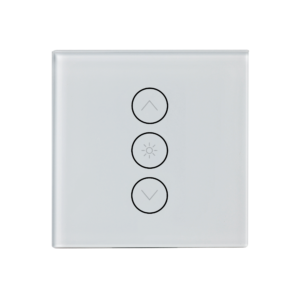
WiFi LED Dimmer Touch Switch – Full Product Overview Introduction The WiFi LED Dimmer Touch Switch is a smart wall switch designed for seamless light control. It features a capacitive touch panel that allows you to adjust brightness with a...
The WiFi LED Dimmer Touch Switch is a smart wall switch designed for seamless light control. It features a capacitive touch panel that allows you to adjust brightness with a simple tap or swipe. With WiFi connectivity, you can control your lighting remotely via smartphone apps, set timers and schedules, and even integrate with voice assistants like Alexa and Google Assistant.
Perfect for modern smart homes, this dimmable switch enhances ambiance, energy efficiency, and convenience while offering a minimalist, stylish design.
✔ WiFi Connectivity – No hub required, connects directly to WiFi.
✔ Smartphone App Control – Works with Smart Life/Tuya app (iOS & Android).
✔ Touch Panel Interface – Elegant, glass touch screen for smooth operation.
✔ Voice Control – Compatible with Alexa & Google Assistant.
✔ Dimmable Lighting – Adjust brightness levels for optimal ambiance.
✔ Custom Scheduling & Timers – Automate lights to turn on/off at specific times.
✔ Energy Efficiency – Reduce electricity usage with custom brightness settings.
✔ Group Control – Sync multiple switches for coordinated lighting control.
✔ Stylish & Durable – Tempered glass panel resists scratches & moisture.
✔ Easy Installation – Fits into standard wall switch boxes, neutral wire required.
✅ Living Rooms & Bedrooms – Set the perfect lighting for relaxation.
✅ Dining Areas – Adjust brightness for intimate or vibrant settings.
✅ Home Offices – Optimize lighting for work efficiency.
✅ Restaurants & Hotels – Create custom ambiance for guests.
✅ Smart Home Automation – Integrates with other smart devices & routines.
⚠ Note: A neutral wire is required for proper installation.
| Feature | Specification |
|---|---|
| Product Type | WiFi LED Dimmer Touch Switch |
| Control Methods | Touch, WiFi App, Voice Control |
| Smart App | Smart Life, Tuya Smart |
| Voice Control | Alexa, Google Assistant |
| WiFi Connectivity | 2.4GHz WiFi (No hub required) |
| Panel Material | Tempered Glass |
| Dimming Capability | Yes, adjustable brightness |
| Voltage | 110-240V AC |
| Power Output | 150W (LED) / 400W (Incandescent) |
| Neutral Wire Required | Yes |
| Installation | Standard wall switch box |
✅ Smart Home Enthusiasts – Upgrade traditional switches to smart lighting.
✅ Homeowners & Renters – Stylish, easy-to-use modern lighting control.
✅ Interior Designers – Enhance home aesthetics with sleek touch switches.
✅ Energy Conscious Users – Optimize brightness levels to reduce electricity bills.
✅ Tech-Savvy Users – Integrate with smart home automation systems.
The WiFi LED Dimmer Touch Switch is a game-changer for smart lighting. It combines stylish design, effortless control, and energy efficiency in one device. Whether you want hands-free lighting, remote access, or a modern touch panel, this smart dimmer switch is the perfect upgrade for any smart home.
✨ Enhance your home lighting experience today with the WiFi LED Dimmer Touch Switch! 🚀


