- top_notice

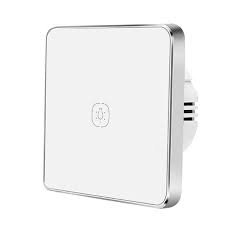
Smart Zigbee Touch Light Switch | Complete Product Guide Introduction The Smart Zigbee Touch Light Switch is a next-generation smart switch designed for modern home automation. It allows users to control lights via touch, voice commands, or remotely through a...
The Smart Zigbee Touch Light Switch is a next-generation smart switch designed for modern home automation. It allows users to control lights via touch, voice commands, or remotely through a smartphone app. Unlike traditional switches, this model is wireless, ultra-responsive, and compatible with Zigbee home automation hubs.
The tempered glass touch panel provides a sleek, stylish look while ensuring durability and resistance to scratches and moisture. The switch supports single, double, and triple-gang configurations, making it adaptable to different lighting setups.
Designed to work with Amazon Echo Plus, Samsung SmartThings, Tuya, and other Zigbee-compatible hubs, this switch is perfect for anyone looking to enhance their smart home with seamless automation, voice control, and remote access.
✔ Touch-Sensitive Glass Panel – Elegant, scratch-resistant tempered glass panel for modern aesthetics.
✔ Zigbee Wireless Connectivity – Works with Zigbee 3.0 smart home hubs for reliable automation.
✔ Voice Control – Compatible with Amazon Alexa, Google Assistant, and Apple HomeKit (via Zigbee Hub).
✔ Remote App Control – Manage lights from anywhere using Tuya, Smart Life, or compatible apps.
✔ Multiple Gang Options – Available in 1, 2, 3, or 4-gang configurations for different lighting needs.
✔ Real-Time Status Updates – See the on/off state of your lights in the app.
✔ Timer & Scheduling – Automate lighting based on time, activity, or motion sensor triggers.
✔ No Neutral Wire Required – Some models support capacitor-based installation for old homes.
✔ Energy Efficient – Auto-off timers & remote scheduling reduce electricity waste.
✔ Smart Scene Integration – Sync with motion sensors, door sensors, or schedules for full automation.
✔ Group Control – Manage multiple switches at once in the app.
✔ Easy Installation – Fits into standard switch boxes with simple wiring setup.
✅ Living Rooms & Bedrooms – Control ambient lighting effortlessly.
✅ Kitchens & Bathrooms – Use touch-sensitive waterproof panels for convenience.
✅ Hallways & Staircases – Automate lighting for safety and ease of use.
✅ Offices & Conference Rooms – Smart control for professional environments.
✅ Rental Properties & Hotels – Modernize spaces for guest convenience.
✔ Zigbee 3.0 Hub (Amazon Echo Plus, Tuya Zigbee Hub, SmartThings, etc.).
✔ Smartphone with the Smart Life, Tuya, or Zigbee-compatible app.
✔ Basic wiring tools (screwdriver, voltage tester, etc.).
| Feature | Specification |
|---|---|
| Protocol | Zigbee 3.0 |
| Power Supply | 110V-250V AC |
| Touch Panel Material | Tempered Glass |
| Gang Options | 1-Gang, 2-Gang, 3-Gang, 4-Gang |
| Compatible Hubs | Amazon Echo Plus, Tuya Zigbee Hub, SmartThings, Home Assistant |
| Control Methods | Touch, App, Voice Control |
| Wireless Range | Up to 30 meters indoors |
| Installation | Standard switch box |
| Operating Temperature | -10°C to 50°C |
| Energy Efficiency | Low standby power consumption |
Yes, a Zigbee 3.0 hub is required to control the switch via smartphone or voice assistants.
Yes, the switch supports Alexa and Google Assistant when connected to a compatible Zigbee hub.
Yes! Zigbee-based smart switches can function locally via their hub, even if the internet is down.
Yes, each gang (switch button) can be independently controlled and scheduled via the app.
You can still use the manual touch function, but remote and voice control will be unavailable.
The Smart Zigbee Touch Light Switch is an essential upgrade for any modern smart home, offering touch-sensitive operation, app control, voice commands, and automation features. Whether you want hands-free lighting, enhanced convenience, or energy savings, this switch delivers it all.
💡 Upgrade to a smarter home with the Zigbee Touch Light Switch today!


