- top_notice

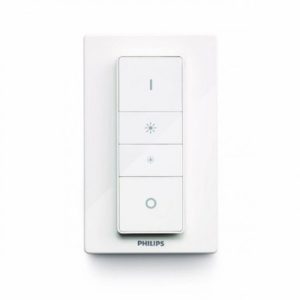
Philips Hue Wireless Dimmer Switch | Full Product Overview Introduction The Philips Hue Wireless Dimmer Switch is an essential accessory for your Philips Hue smart lighting system. Designed for effortless wireless control, this compact and stylish switch lets you turn...
The Philips Hue Wireless Dimmer Switch is an essential accessory for your Philips Hue smart lighting system. Designed for effortless wireless control, this compact and stylish switch lets you turn lights on/off, adjust brightness, and switch between preset scenes without needing your phone or voice assistant.
Unlike traditional dimmer switches, the Hue Dimmer Switch is battery-powered, wire-free, and can be mounted anywhere using adhesive strips or screws. Alternatively, it can function as a portable remote control for flexible lighting adjustments in any room.
This user-friendly smart switch is compatible with Philips Hue smart bulbs, lamps, and lightstrips, making it a must-have for smart home automation.
✔ Wireless & Battery-Powered – No wiring required, allowing quick setup.
✔ Dimming & Brightness Control – Effortlessly adjust brightness levels.
✔ Scene Selection – Switch between pre-set Philips Hue lighting scenes.
✔ Easy Installation & Portability – Use as a wall switch or handheld remote.
✔ Compatible with Hue Bridge & Bluetooth – Works with Bluetooth (direct control) or via the Hue Bridge for advanced automation.
✔ Magnetic Backplate – Attach to a fridge or metal surface for easy access.
✔ Smart Home Integration – Works with Alexa, Google Assistant, and Apple HomeKit (requires Hue Bridge).
✔ Long Battery Life – Lasts 2+ years on a single battery.
The Philips Hue Dimmer Switch is designed for quick and easy setup. Unlike traditional dimmers that require electrical wiring, this switch is battery-powered and completely wireless. Simply:
With the Hue Dimmer Switch, you can:
✅ Living Rooms & Bedrooms – Easily adjust brightness without using a phone.
✅ Offices & Workspaces – Set the perfect lighting for productivity.
✅ Kitchens & Dining Areas – Create ambient lighting scenes for cooking & dining.
✅ Home Theaters & Gaming Rooms – Switch lighting modes for an immersive experience.
✅ Hallways & Entryways – Conveniently turn lights on/off when entering or leaving.
| Feature | Specification |
|---|---|
| Product Type | Wireless Dimmer Switch |
| Power Source | Battery-Powered (CR2450) |
| Battery Life | 2+ years |
| Connectivity | Zigbee (Hue Bridge) & Bluetooth |
| Compatible Devices | Philips Hue Bulbs, Lamps, Lightstrips |
| Control Methods | Wireless Remote, App, Voice (via Hue Bridge) |
| Mounting Options | Adhesive, Screws, Magnetic Backplate |
| Smart Home Integration | Alexa, Google Assistant, Apple HomeKit (via Hue Bridge) |
| Dimensions | 88 x 35 x 11 mm |
| Color | White |
✅ Homeowners & Renters – Enjoy smart lighting control without rewiring.
✅ Smart Home Enthusiasts – Ideal for Philips Hue users expanding their system.
✅ Elderly & Accessibility Needs – A simple alternative to smartphone apps.
✅ Energy-Conscious Users – Automate lighting to reduce energy waste.
The Philips Hue Wireless Dimmer Switch is a game-changer for smart home lighting. Whether you want wireless dimming, scene selection, or full home automation, this easy-to-use, battery-powered smart switch is an essential accessory for Philips Hue users.
💡 Upgrade your smart home today with the Philips Hue Wireless Dimmer Switch!


