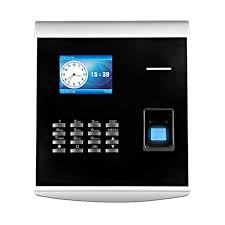
Online Free Cloud-Based WiFi Fingerprint Time and Attendance System
Introduction
Managing employee attendance efficiently is a critical part of running any organization. Traditional attendance tracking methods, such as manual registers or punch cards, often lead to errors, fraud, and inefficiencies. A WiFi-enabled, cloud-based fingerprint time and attendance system solves these problems by offering a seamless, automated, and tamper-proof solution.
This guide will cover:
✔ How the system works
✔ Key features and benefits
✔ Setup and installation
✔ How it enhances workforce management
✔ Cost considerations and free solutions
1. What is an Online Cloud-Based WiFi Fingerprint Time and Attendance System?
A WiFi fingerprint time and attendance system is a biometric attendance solution that enables employees to clock in and out using their fingerprints, with data stored in the cloud. These systems eliminate buddy punching, improve accuracy, and allow real-time attendance tracking from any location.
Key Features:
🔹 WiFi-Enabled – No need for wired connections; syncs automatically.
🔹 Cloud-Based Storage – Access attendance records from anywhere.
🔹 Fingerprint Biometric Security – Prevents fraud and ensures accurate tracking.
🔹 Real-Time Monitoring – View attendance reports instantly.
🔹 Multi-Location Access – Manage employees across different branches seamlessly.
🔹 Payroll Integration – Automates timesheets and salary calculations.
🔹 Free Plans Available – Many providers offer free versions with limited users.
2. How Does It Work?
1️⃣ Employee Registration – Each employee's fingerprint is scanned and stored securely in the system.
2️⃣ Clocking In & Out – Employees scan their fingerprint on the device, which syncs the data via WiFi to the cloud.
3️⃣ Data Processing – The system records work hours, late arrivals, and overtime automatically.
4️⃣ Manager Access – HR managers or business owners can log in to the cloud dashboard from any device.
5️⃣ Automated Reports – Attendance data is available in real-time, exportable in Excel or PDF formats.
3. Key Benefits
✔ Eliminates Time Theft & Buddy Punching
Biometric authentication ensures that only authorized employees can clock in, reducing fraud.
✔ Remote Access for HR & Management
With cloud-based storage, HR teams can monitor attendance across multiple locations without being physically present.
✔ Accurate Payroll Processing
Integrates with payroll software to automate salary calculations based on actual worked hours.
✔ Improves Compliance & Record-Keeping
Stores secure, tamper-proof attendance logs for labor law compliance.
✔ Saves Costs & Increases Productivity
Reduces the administrative burden of manual timesheets and minimizes payroll errors.
✔ Free Cloud-Based Solutions
Many software providers offer free plans for small businesses with basic attendance tracking.
4. Setting Up the System
A. Required Components
✔ WiFi Fingerprint Scanner – The biometric device to scan employee fingerprints.
✔ Cloud-Based Software – A web-based dashboard to manage and view attendance.
✔ WiFi Network – Ensures real-time syncing of attendance data.
✔ Mobile & Desktop Access – Managers and employees can access records from any device.
B. Installation Process
1️⃣ Choose a System Provider – Select a free or paid cloud-based WiFi fingerprint attendance solution.
2️⃣ Install the Biometric Device – Connect it to the WiFi network.
3️⃣ Register Employees – Enroll fingerprints into the system.
4️⃣ Configure Cloud Software – Set up shifts, work hours, and reporting settings.
5️⃣ Test & Deploy – Run test logins to ensure proper data syncing.
5. Best Free Cloud-Based Attendance Systems
If you're looking for a free WiFi biometric attendance system, here are some recommended options:
A. Free Software Solutions
✅ Clockify – Free time tracking with cloud access (manual entry, no fingerprint).
✅ Jibble – Free biometric attendance tracking for small teams.
✅ Open Time Clock – Free for unlimited users (basic features).
B. Open-Source Options
✅ BioStar 2 – A biometric access control and attendance system with a free cloud version.
✅ OpenATT – Free and open-source attendance tracking.
Most free plans come with limited users and basic features, but they are great for small businesses or startups looking for cost-effective solutions.
6. Choosing the Right System for Your Business
When selecting a cloud-based WiFi fingerprint time and attendance system, consider the following:
✔ Number of Employees – Choose a system that supports your workforce size.
✔ Integration with Payroll – Ensure compatibility with your payroll software.
✔ Data Security & Compliance – Check if the system follows GDPR or labor law regulations.
✔ User-Friendly Interface – A system that is easy to use will improve employee adoption.
✔ Cost & Scalability – Start with a free plan and upgrade as your business grows.
7. Potential Challenges & Solutions
🚧 Connectivity Issues
Solution: Ensure a stable WiFi network or choose systems that offer offline mode with auto-sync.
🚧 Fingerprint Recognition Errors
Solution: Use high-quality scanners and allow alternative authentication methods like PIN or facial recognition.
🚧 Data Privacy Concerns
Solution: Choose providers that offer end-to-end encryption and secure cloud storage.
🚧 Limited Free Features
Solution: Start with a free plan and consider upgrading for additional features like payroll integration.
8. Conclusion
A free cloud-based WiFi fingerprint time and attendance system is an efficient, secure, and cost-effective way to manage employee workforce attendance. Whether you run a small business, corporate office, or remote team, these systems increase accountability, streamline payroll, and provide real-time workforce insights.
If you're looking for a free attendance system, explore Jibble, Open Time Clock, or Clockify for basic tracking. For more advanced features like payroll integration and multi-location access, consider upgrading to a paid plan.
Would you like specific software recommendations or assistance in setting up your system? Let me know! 🚀