- top_notice

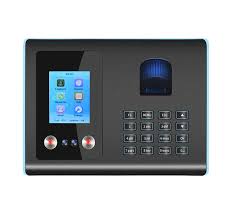
Biometric Fingerprint Time Clock Attendance System with Face Recognition 1. Introduction Managing employee attendance is crucial for any organization. Traditional attendance methods, such as punch cards or manual logs, are prone to errors, time theft, and buddy punching. A Biometric...
Managing employee attendance is crucial for any organization. Traditional attendance methods, such as punch cards or manual logs, are prone to errors, time theft, and buddy punching. A Biometric Fingerprint Time Clock with Face Recognition offers a secure, efficient, and automated way to track employee attendance.
This system combines fingerprint scanning and facial recognition to ensure that only authorized employees can check in. It is ideal for offices, factories, hospitals, schools, and businesses that require precise attendance tracking without manual intervention.
A Biometric Fingerprint Time Clock with Face Recognition uses advanced biometric technology to identify employees based on unique physical characteristics.
1️⃣ Employee Enrollment: Employees register their fingerprints and facial features in the system.
2️⃣ Clocking In & Out: Employees scan their fingerprint or face at the biometric terminal.
3️⃣ Data Storage & Processing: Attendance records are automatically stored in the device or cloud-based system.
4️⃣ Real-Time Monitoring: HR and managers can view reports instantly from a dashboard.
5️⃣ Payroll Integration: The system calculates worked hours, overtime, and absences for seamless payroll processing.
Enhances security by ensuring accurate employee verification.
Prevents buddy punching (employees clocking in for each other).
Works even if fingerprints are dirty, worn, or unavailable.
Managers can track employee clock-in/clock-out times remotely.
Attendance data is updated instantly through WiFi/cloud integration.
Data can be stored locally in the device or synced to the cloud for remote access.
Cloud-based storage allows multi-location workforce tracking.
Generates detailed timesheets, overtime records, and leave reports.
Reduces payroll errors and automates salary calculations.
Can handle hundreds or thousands of employees.
Suitable for businesses with multiple branches/offices.
Supports WiFi synchronization for instant updates.
USB download option available for offline attendance tracking.
Reduces contact points, ensuring a hygienic check-in process.
Works in low-light conditions with infrared facial scanning.
Equipped with fingerprint scanner and face recognition camera.
Stores biometric data securely with high-speed processing.
Web-based dashboard for real-time attendance tracking.
Generates reports for HR, payroll, and compliance purposes.
WiFi, LAN, or USB for data transfer.
Cloud-based systems require an internet connection for real-time access.
Employees can check attendance records via a mobile app.
Managers can approve leaves and monitor workforce remotely.
1️⃣ Choose a Device: Select a biometric terminal based on employee size and features required.
2️⃣ Install at Entry Points: Mount the device at the office entrance or designated check-in area.
3️⃣ Register Employees: Capture fingerprints and facial features of all employees.
4️⃣ Connect to Network: Configure WiFi, LAN, or USB for data transfer.
5️⃣ Set Up Software: Integrate with payroll, HR software, and cloud storage.
6️⃣ Test & Deploy: Conduct trial check-ins before full implementation.
✅ Corporate Offices – Ensures accurate work hours and prevents proxy attendance.
✅ Factories & Manufacturing – Tracks shift workers efficiently.
✅ Healthcare & Hospitals – Touchless face recognition enhances hygiene.
✅ Educational Institutions – Automates teacher and student attendance.
✅ Retail & Hospitality – Monitors multiple locations from a single dashboard.
When selecting a Biometric Fingerprint Time Clock with Face Recognition, consider:
✔ Number of Employees – Choose a system that supports your workforce size.
✔ Integration Needs – Ensure it works with payroll and HR software.
✔ Storage Type – Opt for cloud-based storage for remote access or on-device storage for offline use.
✔ Budget – Compare free vs. paid plans based on features and scalability.
✔ Ease of Use – A user-friendly interface simplifies employee adoption.
🚧 Fingerprint Recognition Issues
✅ Use a high-quality scanner and enable face recognition as an alternative.
🚧 Connectivity Problems
✅ Choose devices with offline mode and auto-sync when internet is available.
🚧 Data Privacy & Security
✅ Ensure end-to-end encryption and GDPR-compliant storage.
🚧 Limited Free Features
✅ Start with a free trial and upgrade as needed.
While some basic biometric attendance systems are available for free, most cloud-based solutions come with monthly or annual fees.
🔹 Jibble – Free for small teams (manual check-in, no fingerprint).
🔹 Clockify – Time tracking without biometrics.
🔹 BioStar 2 – Free biometric access control software.
🔹 ZKTeco Biometric Time Clocks – Affordable & widely used.
🔹 uAttend Cloud-Based Biometric Systems – Full-featured with payroll integration.
🔹 Anviz Face Recognition Time Clocks – AI-powered attendance tracking.
A Biometric Fingerprint Time Clock with Face Recognition is the most secure and efficient way to manage employee attendance. By eliminating time fraud, automating payroll, and enabling real-time tracking, this system boosts workforce productivity.
For small businesses, free solutions like Jibble or Clockify can offer basic tracking. For medium and large enterprises, paid biometric systems with WiFi/cloud integration are highly recommended.
Would you like assistance in selecting the best device for your business? Let me know! 🚀


