- top_notice

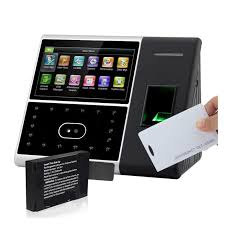
Biometric Face Time Attendance System with USB Fingerprint Reader Introduction Employee time tracking is essential for payroll accuracy, workforce efficiency, and security. Traditional punch clocks and manual logbooks are prone to errors, time theft, and buddy punching. The Biometric Face...
Employee time tracking is essential for payroll accuracy, workforce efficiency, and security. Traditional punch clocks and manual logbooks are prone to errors, time theft, and buddy punching. The Biometric Face Time Attendance System with USB Fingerprint Reader offers a modern, automated solution using biometric technology to prevent fraud, improve efficiency, and simplify payroll processing.
This guide provides a detailed overview of the device, including features, benefits, installation, maintenance, and comparisons with other attendance tracking solutions.
This multi-biometric time clock offers the following authentication methods:
Facial Recognition – Uses an advanced infrared camera to identify employees accurately.
Fingerprint Authentication – Ensures foolproof identity verification.
PIN & Password Access – Alternative method for employees who prefer manual clock-in.
USB Connectivity – Enables easy data transfer and payroll integration.
Designed for businesses, factories, retail stores, and offices, this system ensures secure and accurate time tracking while preventing unauthorized access.
Facial Recognition: The built-in camera captures and verifies an employee’s facial features within seconds.
Fingerprint Scanning: Advanced fingerprint sensors recognize individual fingerprints with high accuracy.
PIN & Password Options: Allows employees to log attendance using a secure personal identification number (PIN) or password.
Time logs can be exported via USB drive for manual payroll processing.
Ensures offline functionality, making it ideal for locations without internet access.
The clear LCD screen displays time logs, employee names, and clock-in status.
Voice prompts notify employees of successful clock-ins.
Infrared sensors detect live faces, preventing employees from using photos or videos to fake attendance.
Advanced fingerprint recognition ensures that only registered employees can clock in.
Stores thousands of facial templates and fingerprints, making it suitable for small, medium, and large businesses.
A built-in battery backup ensures the system continues to function during power outages.
The infrared camera allows facial recognition even in low-light or outdoor environments.
Export attendance data via USB and upload it to payroll management software for seamless salary calculations.
Employees cannot fake clock-ins with biometric authentication.
Facial recognition and fingerprint scanning ensure attendance accuracy.
Employees clock in within seconds, reducing congestion at entry points.
Real-time attendance tracking allows HR to monitor employee work hours instantly.
Prevents unauthorized personnel from entering restricted areas.
Allows businesses to track who enters and exits the premises.
Automates time-tracking, reducing manual data entry mistakes.
Ensures accurate payroll processing, preventing salary disputes.
Eliminates the need for physical punch cards, RFID badges, or paper-based tracking systems.
One-time investment with minimal maintenance costs.
Inside the package, you will find:
Biometric Face Time Attendance System with USB Fingerprint Reader
Power Adapter
Mounting Screws & Wall Bracket
User Manual
Mount the device at eye level (4.5-5 feet high) for accurate facial recognition.
Ensure proper lighting but avoid direct sunlight, which may interfere with scanning.
Position near the main entrance or employee check-in point for convenience.
Register employee facial data and fingerprints in the system.
Assign unique PINs for employees who prefer manual clock-in.
Configure work shifts, overtime rules, and holidays in the software.
Use USB transfer to export attendance logs for payroll processing.
Upload data into compatible payroll software for automatic calculations.
Wipe the facial recognition camera lens with a microfiber cloth.
Clean the fingerprint scanner with an alcohol-based wipe for accurate detection.
Regularly update firmware to improve accuracy and security.
| Issue | Possible Solution |
|---|---|
| Face not recognized | Ensure good lighting and ask employee to remove glasses or hats |
| Fingerprint not detected | Clean the scanner and ask employee to reposition their finger |
| USB data not transferring | Use a different USB drive and check format compatibility |
| Device slow to respond | Restart the system and update software |
| Feature | Biometric Face Time Attendance System | Traditional Punch Time Clock |
|---|---|---|
| Authentication | Facial recognition, fingerprint, PIN | Manual punch cards |
| Security | High (Prevents buddy punching) | Low (Easily manipulated) |
| Payroll Integration | Yes, via USB & software | Manual entry required |
| Data Storage | Digital (USB/cloud/network) | Physical time cards |
| Cost | Higher initial investment | Lower upfront, but costly long-term maintenance |
For businesses seeking high security, efficiency, and accuracy, the Biometric Face Time Attendance System is the best choice. However, for companies with minimal security concerns, a manual punch clock may be a low-cost alternative.
The Biometric Face Time Attendance System with USB Fingerprint Reader is a cutting-edge workforce management solution that eliminates time fraud, reduces payroll errors, and enhances workplace security.
With facial recognition, fingerprint authentication, and USB data transfer, this system is ideal for businesses, factories, offices, and retail stores looking for a reliable and secure attendance-tracking solution.
For organizations aiming to upgrade their time management systems, this biometric time clock provides a future-proof, efficient, and cost-effective solution.


