- top_notice

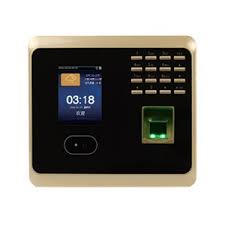
UF100plus Biometric Face Attendance System Introduction Employee attendance tracking has evolved significantly, with biometric technology replacing traditional punch clocks and manual record-keeping. The UF100plus Biometric Face Attendance System is designed for businesses that require high accuracy, security, and efficiency in...
Employee attendance tracking has evolved significantly, with biometric technology replacing traditional punch clocks and manual record-keeping. The UF100plus Biometric Face Attendance System is designed for businesses that require high accuracy, security, and efficiency in workforce management.
This guide provides a detailed overview of the UF100plus, including its features, benefits, setup process, maintenance, and comparison to other attendance tracking solutions.
The UF100plus is a state-of-the-art biometric time clock that offers:
Face recognition technology for contactless clocking.
Fingerprint scanning for added security and flexibility.
PIN and password authentication for alternative clocking methods.
Large LCD screen for an intuitive user experience.
Seamless integration with payroll systems for real-time data tracking.
This device is designed to prevent buddy punching (time fraud), unauthorized access, and attendance discrepancies, making it an ideal solution for businesses, schools, factories, and offices.
Facial Recognition: Uses an infrared camera to scan employees' faces, allowing for touchless and hygienic attendance tracking.
Fingerprint Scanning: Ensures accurate identity verification, preventing buddy punching.
PIN & Password Entry: Provides additional clock-in options when biometrics are unavailable.
A bright LCD screen enables easy navigation.
Employees can see their clock-in status in real time.
Voice prompts and notifications guide users through the process.
The system connects to HR and payroll software, ensuring automatic and error-free time calculations.
Data can be exported via USB, TCP/IP (network), or Wi-Fi (if available).
Can store up to thousands of facial templates and fingerprints, making it suitable for large organizations.
The advanced infrared sensors prevent clock-ins using photos or videos, ensuring genuine verification.
Uses infrared light technology to detect faces in low-light environments, making it effective indoors and outdoors.
The built-in battery backup ensures uninterrupted operation during electrical failures.
Facial recognition and fingerprint authentication are processed within one second, ensuring smooth clock-ins during busy work hours.
Prevents buddy punching, where employees clock in for absent colleagues.
Reduces manual time entry errors, ensuring accurate payroll calculations.
Faster clock-in process reduces long queues at entry points.
Employees can quickly view their attendance logs, promoting transparency.
Restricts unauthorized access to sensitive workplace areas.
Only registered employees can use the system, preventing security breaches.
Automates time tracking, reducing the HR department’s administrative workload.
Lowers expenses by eliminating the need for physical time cards or RFID badges.
Supports multiple data transfer methods (USB, TCP/IP, and cloud integration).
Can be integrated with payroll management software for streamlined salary calculations.
Inside the package, you will find:
1 UF100plus Biometric Face & Fingerprint Time Clock
Power Adapter
Mounting Screws and Wall Bracket
User Manual
Place the device at eye level (about 4.5-5 feet high) for optimal facial recognition.
Ensure the area has good lighting but no direct sunlight, which can affect facial scans.
Keep it near an entry point where employees can easily access it when arriving or leaving work.
Register each employee with facial recognition and fingerprint scanning.
Assign unique PINs for alternative access.
Store employee ID numbers to match attendance logs with payroll records.
Use USB, network cable (TCP/IP), or cloud-based software for payroll integration.
Set up automatic attendance reports to streamline payroll processing.
Clean the facial recognition camera regularly to remove dust or smudges.
Wipe the fingerprint scanner with a soft, alcohol-based cloth to maintain accuracy.
Periodically update the device firmware to enhance security and performance.
| Issue | Possible Solution |
|---|---|
| Face not recognized | Ensure proper lighting and ask employee to stand within the recommended range |
| Fingerprint not detected | Clean the scanner and ask the employee to re-register their fingerprint |
| Device not syncing with payroll software | Check network connections and verify settings |
| Slow response time | Restart the device and update the software |
| Feature | UF100plus Biometric Time Clock | Traditional Punch Time Clock |
|---|---|---|
| Authentication | Facial Recognition, Fingerprint, PIN | Manual Punch Cards |
| Security | High (Biometric Authentication) | Low (Cards can be stolen/lost) |
| Payroll Integration | Yes, real-time sync | Manual data entry required |
| Data Storage | Digital (Cloud/USB/Network) | Physical time cards |
| Cost | Higher initial investment | Lower upfront cost but higher long-term admin expenses |
For businesses needing advanced automation, security, and efficiency, the UF100plus is the ideal choice. However, for companies preferring a basic, low-tech solution, manual punch clocks may still be an option.
The UF100plus Biometric Face Attendance System & Fingerprint Time Clock is a cutting-edge solution for businesses seeking accurate, secure, and efficient employee time tracking.
With multi-biometric authentication, real-time payroll integration, and anti-spoofing technology, this device eliminates time fraud, improves efficiency, and enhances workplace security.
For organizations looking to upgrade their workforce management system, the UF100plus offers a robust, future-proof solution that ensures accurate attendance records and streamlined payroll processing.


