- top_notice

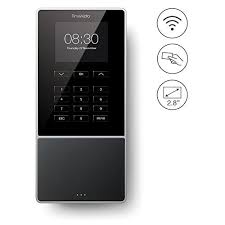
Comprehensive 3000-Word Explanation of the ADP InTouch 9000 8609000-428 Badge Clock Introduction Workforce management has evolved with technology, offering businesses more efficient ways to track employee attendance, control labor costs, and ensure compliance with labor laws. The ADP InTouch 9000...
Workforce management has evolved with technology, offering businesses more efficient ways to track employee attendance, control labor costs, and ensure compliance with labor laws. The ADP InTouch 9000 8609000-428 Badge Clock is an advanced time-tracking solution that combines badge-based authentication with biometric verification for enhanced security.
This guide provides a detailed overview of the ADP InTouch 9000, including its features, benefits, installation process, maintenance requirements, and a comparison to traditional time clocks.
The ADP InTouch 9000 is a next-generation employee time clock that integrates seamlessly with ADP’s workforce management systems. Designed for businesses of all sizes, it offers multiple authentication options, allowing employees to clock in using a badge swipe, PIN entry, or biometric fingerprint scan.
With a large touchscreen display, real-time data integration, and customizable workflows, the InTouch 9000 provides more than just attendance tracking—it also enables employee self-service functions, such as checking schedules, requesting time off, and receiving messages from management.
Badge Scanning: Employees can swipe RFID or magnetic stripe badges to clock in and out.
Biometric Fingerprint Authentication: Enhances security by ensuring only authorized employees can clock in.
PIN Entry: Provides an alternative option for employees without badges or biometrics.
The intuitive touchscreen provides a user-friendly interface, making it easy for employees to interact with the system. The high-resolution display ensures clear visibility for punching in, checking work schedules, and reviewing messages.
The device syncs in real time with ADP's payroll and time management solutions, ensuring accurate record-keeping and eliminating manual data entry errors.
Employees can view work schedules directly from the device.
Request time off without needing to go through HR manually.
Receive company announcements and messages directly on the screen.
Designed for high-traffic environments, ensuring longevity.
Tamper-resistant casing prevents unauthorized access.
Power backup support ensures continued operation during power outages.
Supports both wired and wireless network connections, allowing businesses to place the device anywhere within their workspace.
Employers can configure workflows to suit their operational needs, including break tracking, job switching, and regulatory compliance features.
Fingerprint scanning ensures accurate identity verification, preventing "buddy punching" (when one employee clocks in for another).
Seamless integration with ADP payroll software reduces human error in time tracking and prevents disputes over work hours.
With self-service features, employees have greater control over their schedules, reducing HR workload and improving workplace efficiency.
Whether for small businesses or large enterprises, the InTouch 9000 can accommodate thousands of employees with its flexible authentication methods and cloud integration.
By accurately tracking hours, breaks, and overtime, the system helps businesses comply with labor laws and avoid potential fines or disputes.
The package typically includes:
1 ADP InTouch 9000 Time Clock
Power Adapter
Mounting Bracket and Screws
User Manual
The device can be wall-mounted or placed on a stand in a central location accessible to employees.
Ensure proximity to power and network connections for uninterrupted operation.
The InTouch 9000 supports Ethernet and Wi-Fi connectivity.
Businesses should configure network settings to integrate with ADP workforce management software.
Employees need to register their fingerprints, badges, or PIN codes into the system.
Assign appropriate roles and access levels to different employees.
ADP releases periodic firmware updates to enhance security and functionality. Businesses should ensure the device is updated regularly.
The touchscreen should be cleaned with a soft, dry cloth to prevent smudging.
The fingerprint sensor should be wiped with alcohol-based cleaner to ensure accurate readings.
| Issue | Solution |
|---|---|
| Employees' fingerprints not recognized | Ensure sensor is clean and ask employees to re-register fingerprints |
| Badge not scanning | Check if badge is damaged and replace if necessary |
| Connection issues | Verify network settings and restart device |
| Software not syncing | Check ADP cloud server status and update firmware |
| Feature | ADP InTouch 9000 | Traditional Punch Clock |
|---|---|---|
| Authentication | Biometric, Badge, PIN | Manual punch-in cards |
| Payroll Integration | Yes, real-time sync with ADP | Manual data entry required |
| Employee Self-Service | Yes | No |
| Security | High (biometric & PIN) | Low (cards can be misused) |
| Data Accuracy | Automated, real-time | Prone to errors |
| Cost | Higher initial investment | Lower initial cost but requires more admin work |
For businesses looking for advanced automation, security, and integration with payroll systems, the ADP InTouch 9000 is the superior choice. However, companies that prefer a low-tech, standalone solution may still opt for a manual punch clock.
The ADP InTouch 9000 8609000-428 Badge Clock is a cutting-edge time tracking solution designed for businesses that prioritize efficiency, security, and accuracy in workforce management. With biometric authentication, badge scanning, and real-time payroll integration, this device reduces administrative workload, improves compliance, and prevents fraudulent timekeeping practices.
For businesses seeking an all-in-one workforce management tool, the ADP InTouch 9000 is a worthwhile investment that delivers long-term value and operational efficiency.


